Changelog
Changelog
Changelog
All
Improvement
Release
Jul 6, 2026
ver 0.26.16
Improvement
Custom View Options
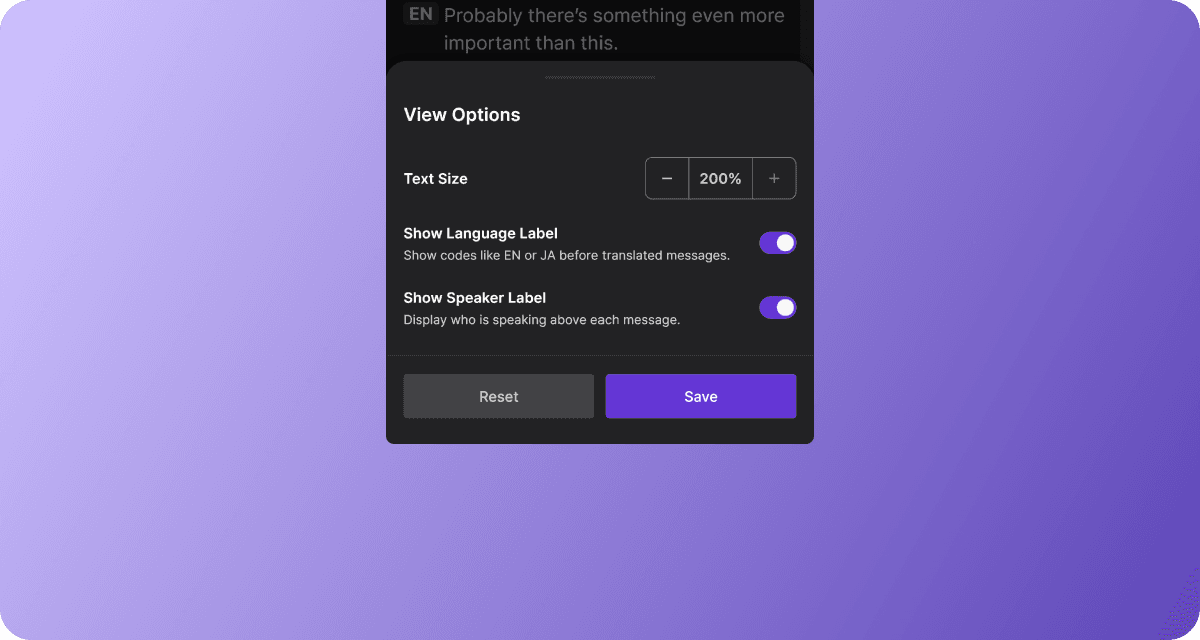
You can increase the transcript text size up to 200% and turn language and speaker labels on or off, allowing you to easily customize the display to your preferences.
Choose QR Code Save Location
You can pick where to save a QR code image when downloading it from the desktop app.
Release
Easier Rename Meetings on Desktop App
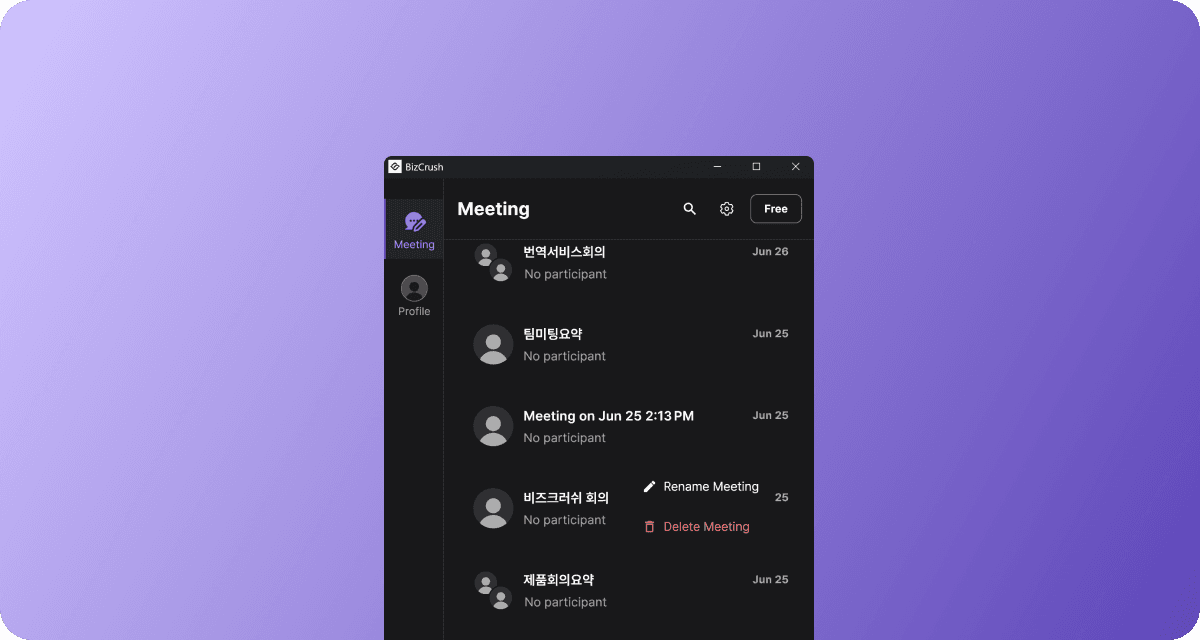
You can now right-click a meeting in the Windows and macOS desktop meeting list to rename it directly.
Jun 17, 2026
ver 0.26.8
Improvement
Language Labels in Live Meetings
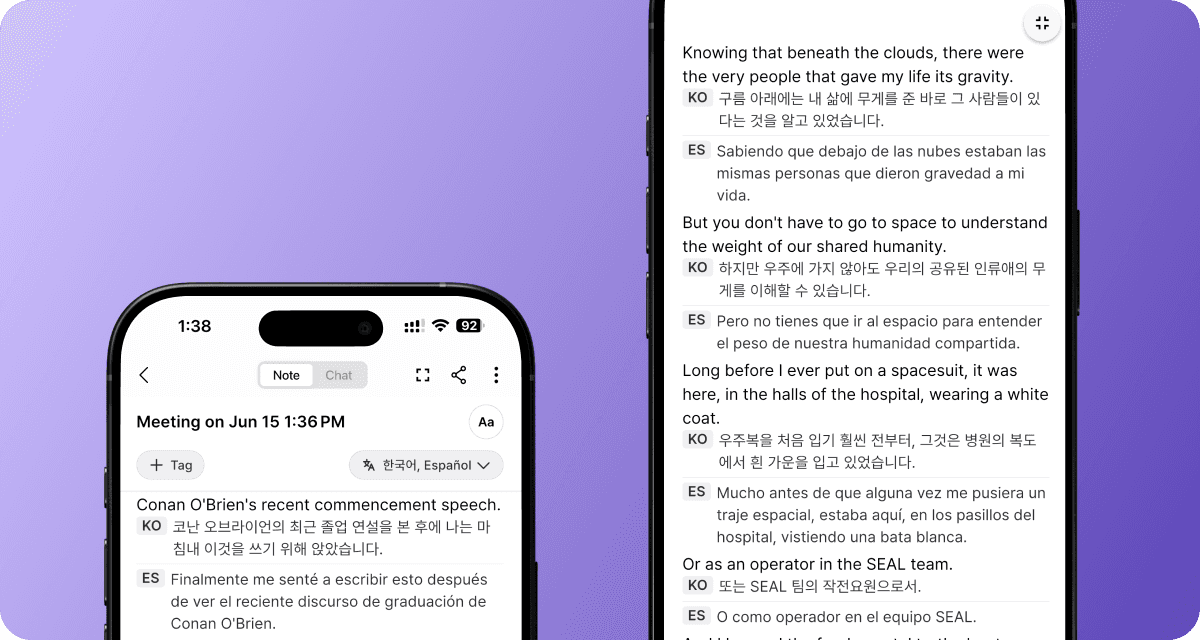
Language labels are now displayed more clearly, helping you quickly identify translations across multiple languages.
Full-Screen Mode
Full-screen mode now hides navigation and menu elements during meetings. Focus on transcripts and translations without distractions.
Release
Search Meeting Transcripts
Quickly find any keyword within a meeting transcript and jump directly to the relevant part of the conversation.
Jun 10, 2026
ver 0.26.7
Improvement
Meeting Room Menu Redesign
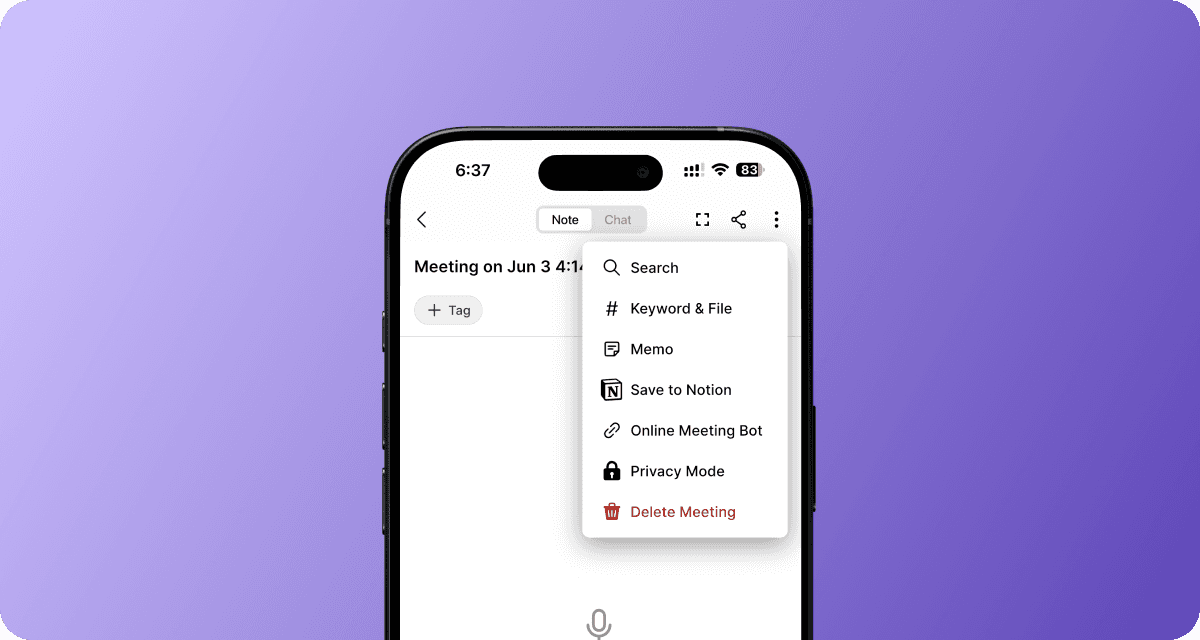
Reorganized the meeting room menu so that frequently used tools like Personal Memo and Notion uploads are easier to find
Sharing UI Update
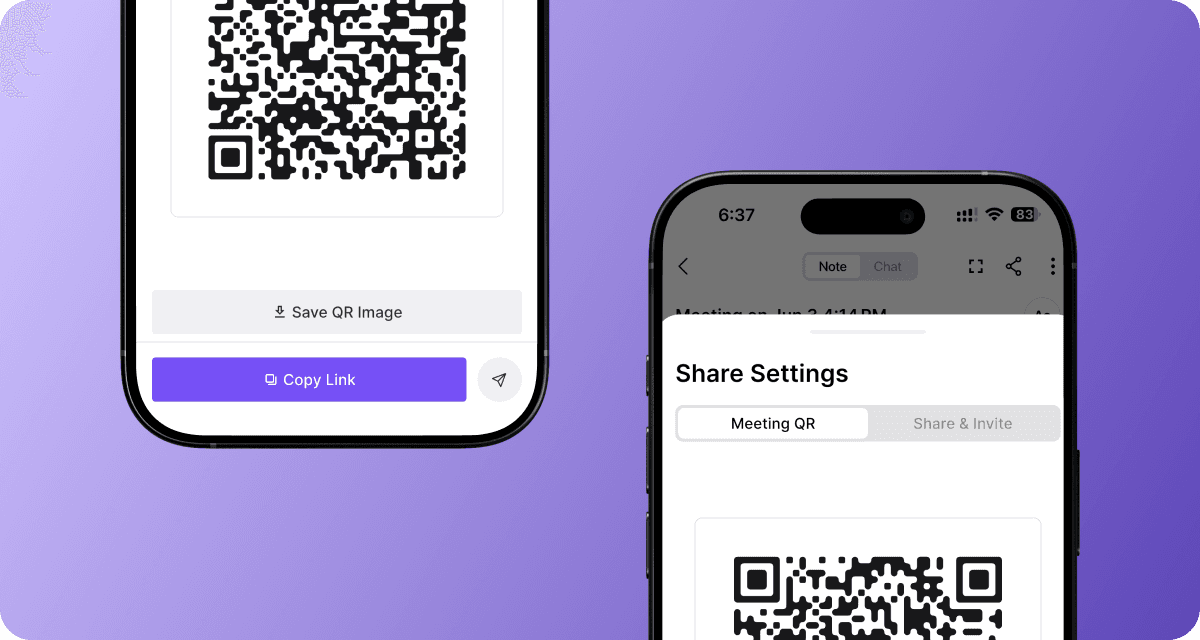
Moved sharing actions into a more intuitive layout.
Larger Live Transcript Text

Increased the maximum transcript text size from 125% to 150% for better readability
Release
Smarter Transcript Editing
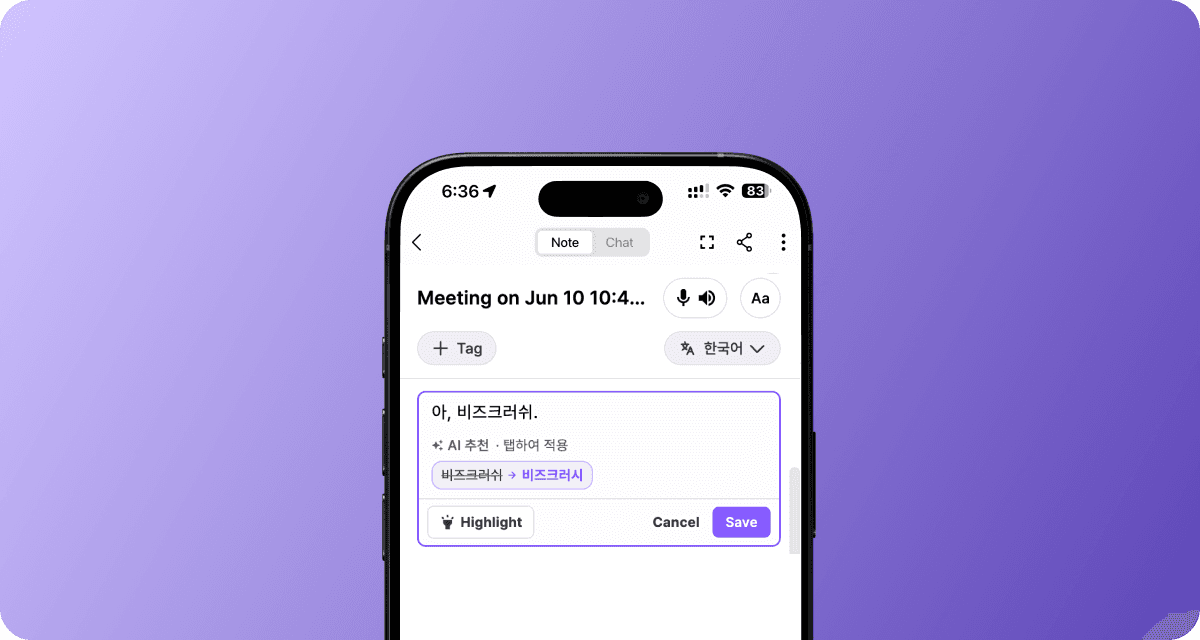
Get AI-powered correction suggestions for potential real-time transcript errors
Jun 1, 2026
ver 0.26.3
Improvement
Share Meetings in One Click
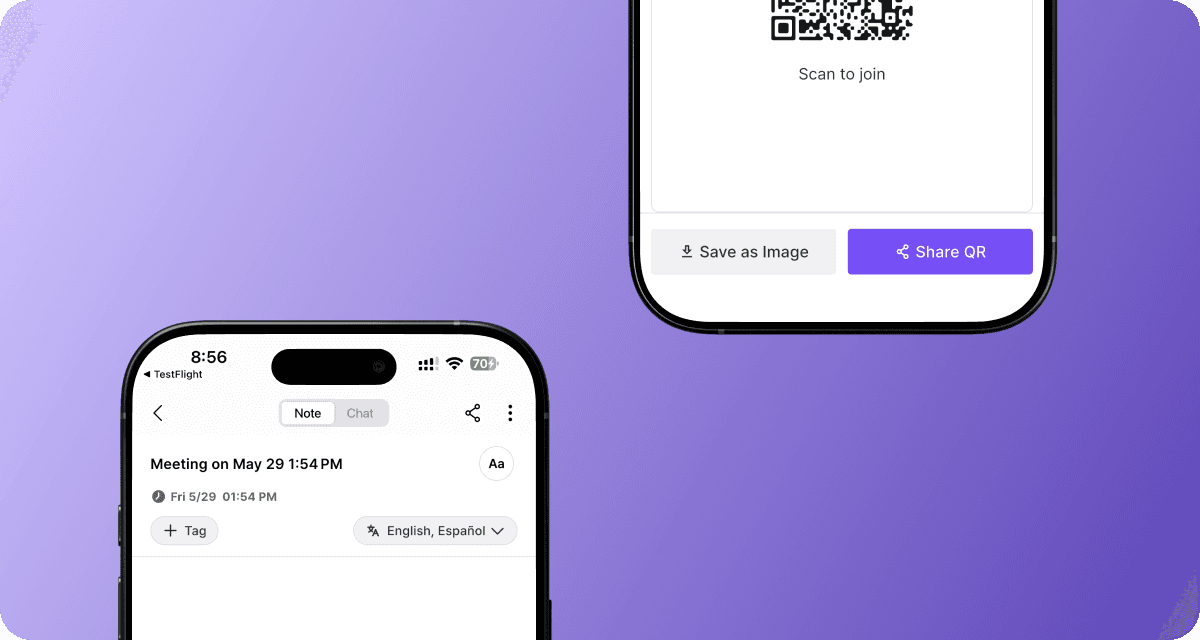
Invite participants faster with the new Share button.
Download a QR code image and share meetings with large groups more easily
Manage Keywords & Context More Easily
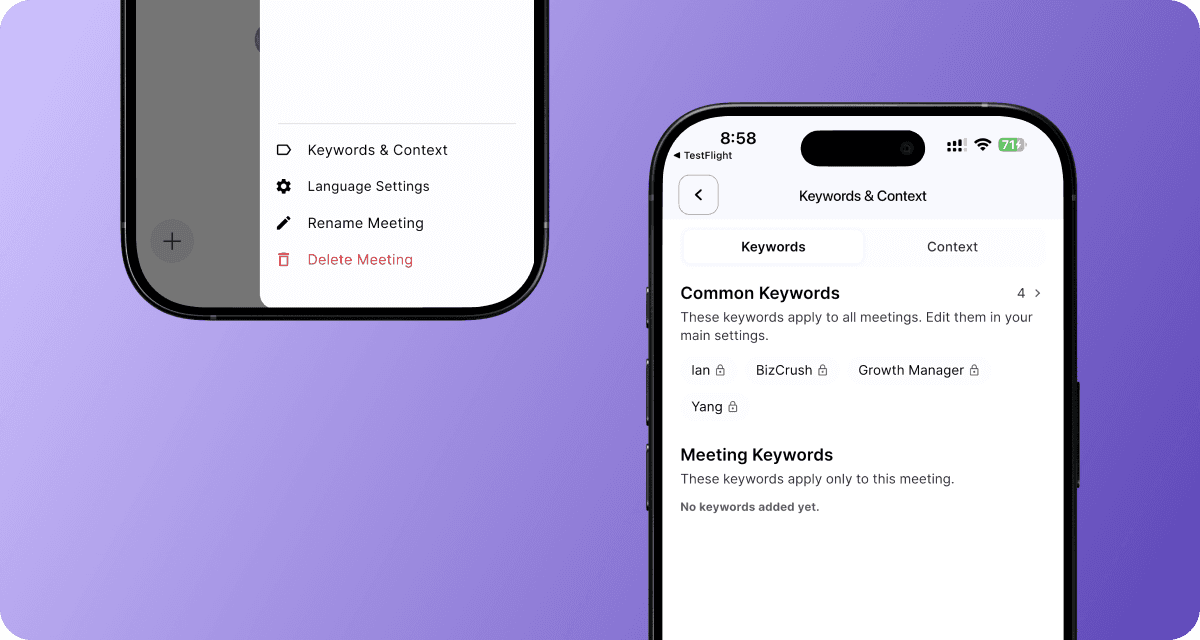
Add and edit meeting keywords and context from one place, right inside the meeting room.
Release
Resize Live Transcripts

Make live transcripts easier to read by adjusting the preferred font size in the meeting room.
May 29, 2026
ver 0.26.0
Improvement
More Precise Sentence Segmentation
Captions and transcripts now handle abbreviations (e.g., Mr., Dr.) and sentence endings more naturally across different languages, making them easier to read.
Release
Post-Meeting Transcript Translation
You can now translate the entire transcript of any completed meeting into your preferred language with a single click. This works for both new and previously recorded meetings.
Google Calendar Sync Support
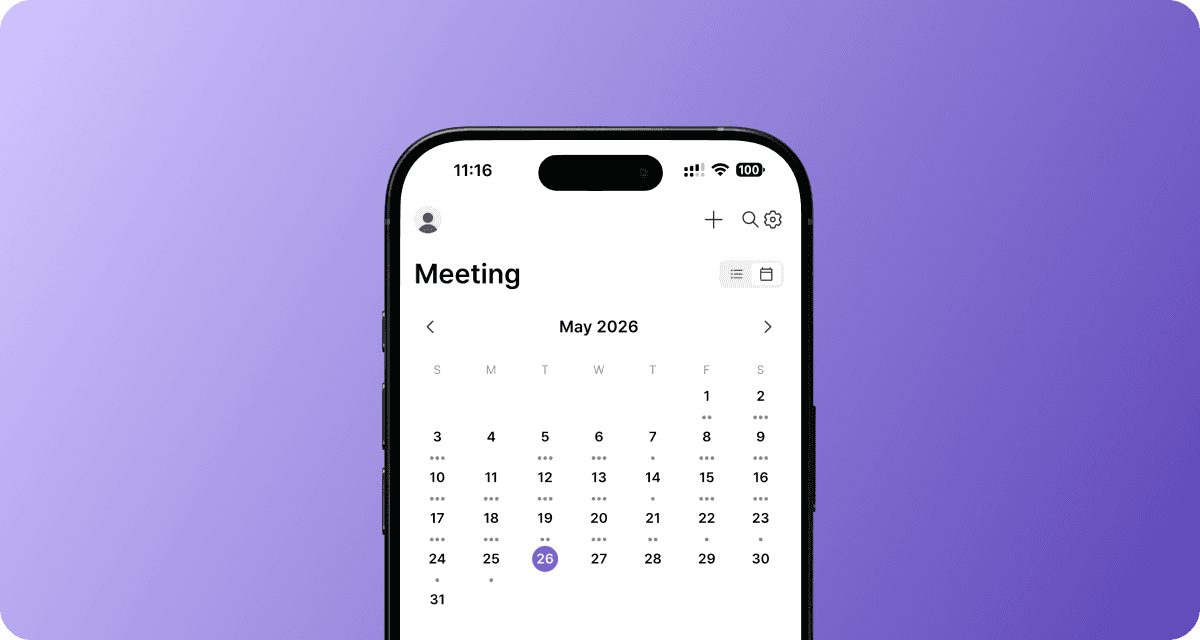
Connect with Google Calendar to automatically sync upcoming meetings and manage them with ease.
May 18, 2026
ver 0.25.8
Improvement
More Reliable Notion Integration
If you need to renew your Notion permissions or run into connection issues, guidance is provided to update the necessary permissions.
Faster Real-Time AI Assistant Responses
No more waiting for AI assistant responses and replies now appear in real time.
Watch streaming responses live as they are generated.
Release
Set Up to Two Translation Languages on the Web
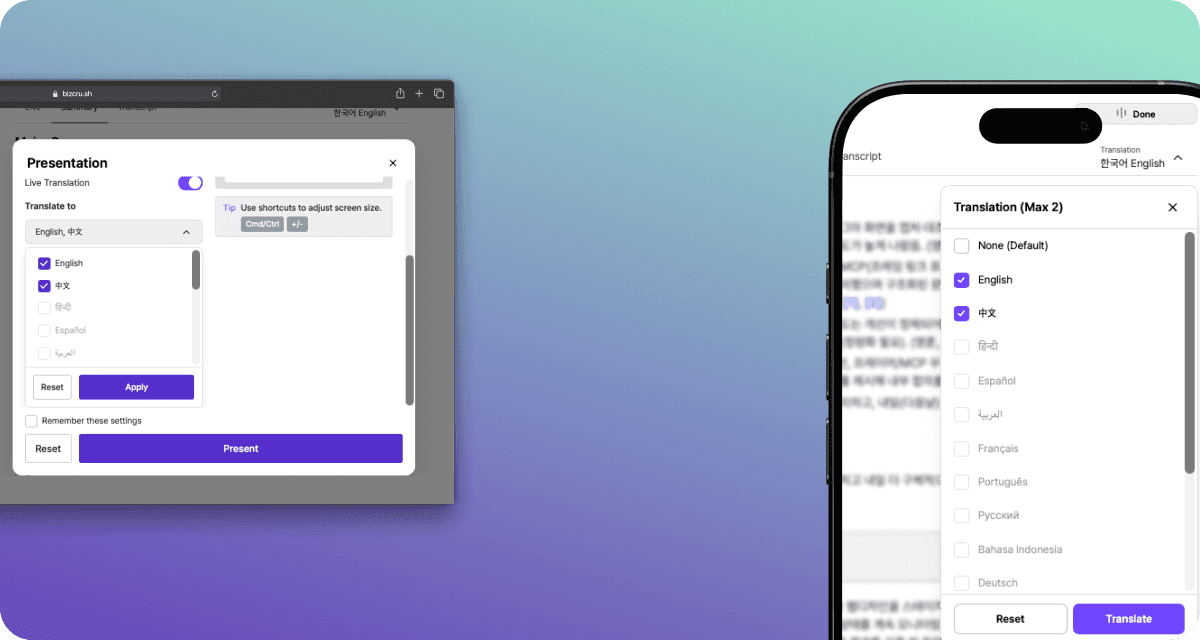
You can now choose up to two translation languages on the web, making multilingual meetings easier to follow.
May 4, 2026
ver 0.24.10
Improvement
More accurate real-time captions
Transcripts are now cleaner and more accurate, with fewer incorrect words and sentences that better reflect what was actually said.
More reliable translations
Translations are now more stable and continue seamlessly even when errors occur, delivering complete results without interruptions.
Apr 30, 2026
ver 0.24.8
Improvement
More reliable calendar-scheduled meetings
The meeting bot now joins calendar-booked meetings more consistently, keeping real-time subtitles stable without interruptions.
Cleaner speaker separation
When speakers switch, transcripts stay clearly separated with no more mixed sentences.
Faster live transcription & translation
Captions and translations kick in faster right at the start of each meeting.
Release
Live transcription for co-hosts
Co-hosts can now control and use live subtitle overlays during meetings, not just the primary host.
Apr 22, 2026
ver 0.24.1
Improvement
Cleaner Transcripts
Merges fragmented speech and removes filler words for more readable transcripts.
More Reliable Audio
Automatically switches to a backup recording if issues occur, so nothing gets lost.
Sensitive info protection
Automatically redacts sensitive information in meetings for safer sharing.
Release
Meeting summary push notifications

Participants now get a push notification when a meeting summary is ready.
Apr 14, 2026
ver 0.23.10
Improvement
Accurate participants’ names in Notion
Participants' names are now displayed more accurately on the Notion page.
More natural live transcription during quiet moments
Live transcription now recognizes silent moments during conversations to generate a more natural transcript.
Release
Online Meeting Support
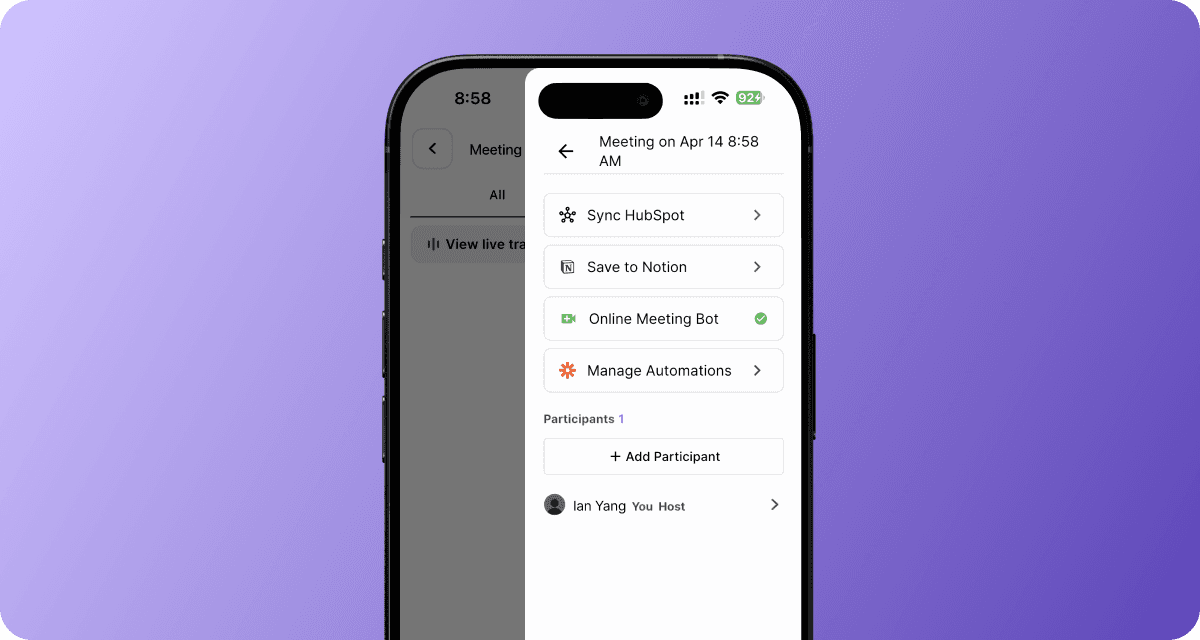
You can now record your online meetings with the BizCrush bot.
Open the side menu in the top-right corner of the meeting room.
Select “Online Meeting Bot” and paste your online meeting link to invite the BizCrush bot.
(Note: You must accept the BizCrush bot’s participation in the online meeting so it can record the session.)The following meeting platforms are supported:
Zoom
Google Meet
Microsoft Teams
Assign a Co-host
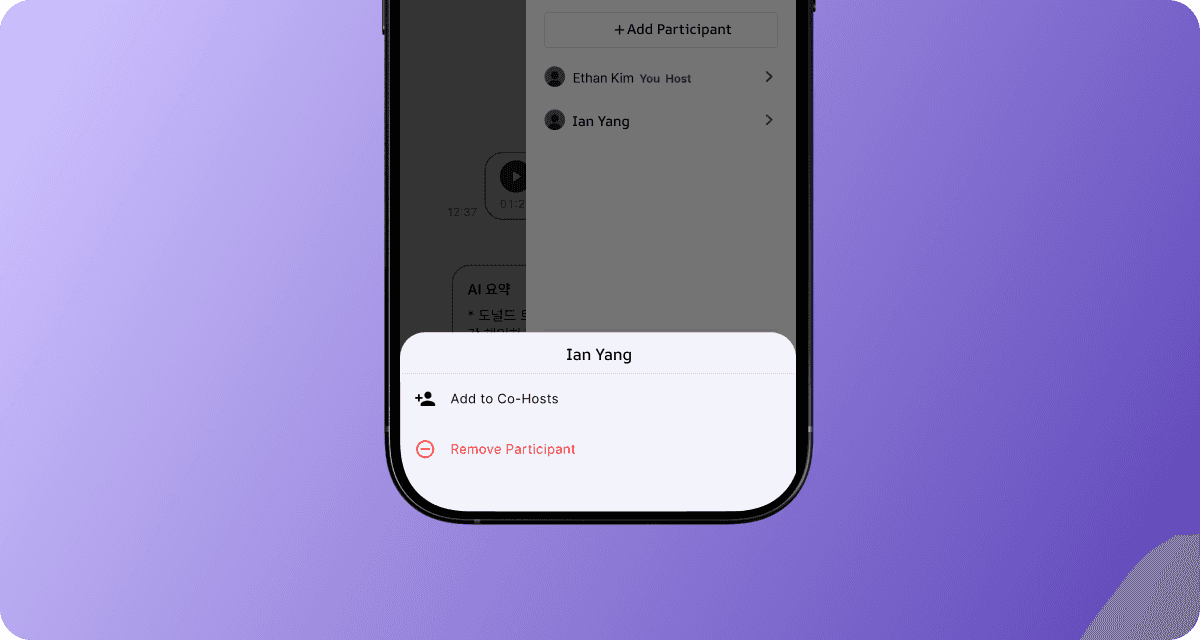
You can now assign invited attendees as co-hosts, allowing them to manage the meeting room.
Open the side menu in the top-right corner of the meeting room.
Tap and hold a participant for 3 seconds to open the “Co-host” menu.
Co-hosts have full access to meeting room controls as the host:
Edit live transcripts
Start/stop recording
Rename the meeting room
Assign speaker labels
Create and send follow-up emails
Mar 27, 2026
ver 0.23.3
Improvement
Accurate Speaker Names in Summary Emails
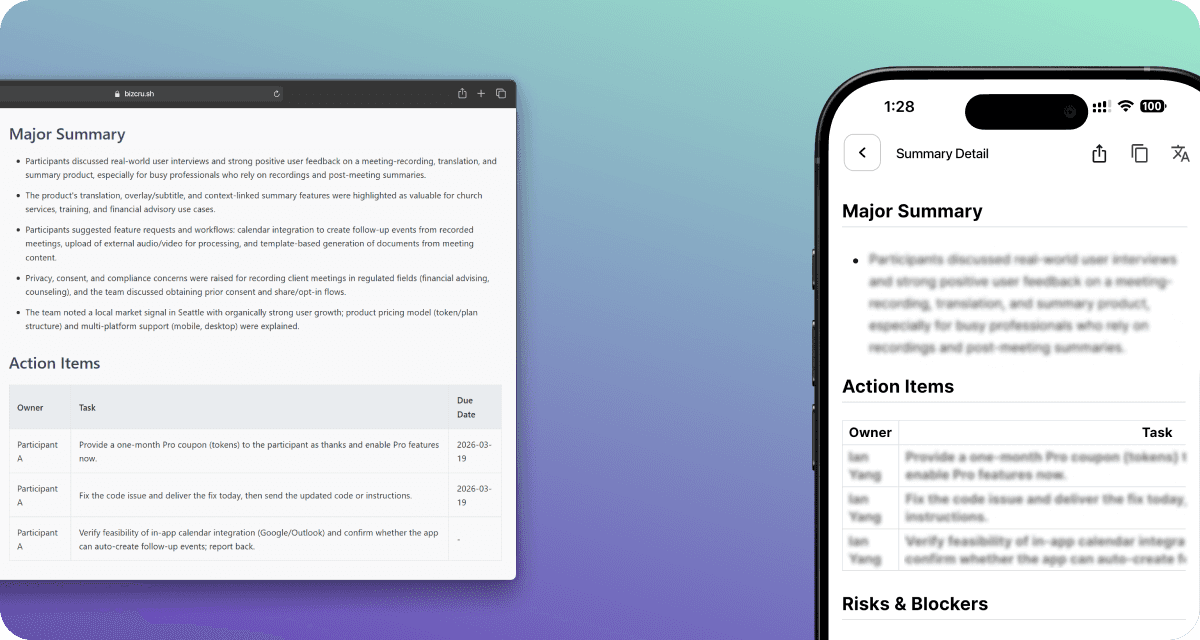
Summary emails now reflect speaker names more accurately based on the meeting script.
Improved Multilingual Meeting Accuracy
Improved language detection and translation quality in meeting transcripts involving +3 languages, with no additional setup required.
Mar 10, 2026
ver 0.22.32
Improvement
More natural live translation
Recent conversation flow and context now help keep live translation tone and phrasing more consistent.
Mar 6, 2026
ver 0.22.32
Improvement
Improved Meeting Summary Table
The meeting summary table now looks cleaner across the app, email, and Notion.
More Accurate Speaker Detection
If the speaker’s identity is recognized during the meeting, the AI automatically updates the transcript afterward and assigns the correct speaker names to each part of the conversation.
Improved Long Speeches Handling
Long speeches are split with accurate timestamps for easier playback.
Enhanced Push Notification
Meeting notifications are now delivered more reliably.
Feb 9, 2026
ver 0.22.25
Improvement
Cleaner Email Summaries
Meeting summaries are now clearer, and easier to scan.
Accurate translation — even for short and broken sentences
Under 300-character utterances are translated with full context accuracy.
Even if speakers stop mid-sentence (”um”, “uh”, “like”), the system reconstructs context and delivers coherent translations.
Release
“View Meeting" button in Emails

Open the full meeting record directly from your email with one click.
Voiceprint Speaker Identification
(Pro plan Only) Automatically detects who’s speaking and labels them by voice
Feb 2, 2026
ver 0.22.20
Improvement
Improved Multilingual Transcription
Non-English languages are now detected and transcribed more accurately.
Faster Real-Time Captions
Live captions load faster and feel smoother on the web.
Release
AI Speaker Name Recognition
Speaker names are automatically inferred from the conversation context and assigned to speaker labels when identified, enabling more accurate meeting summaries.
Live Speech-to-Speech Interpretation (Web)
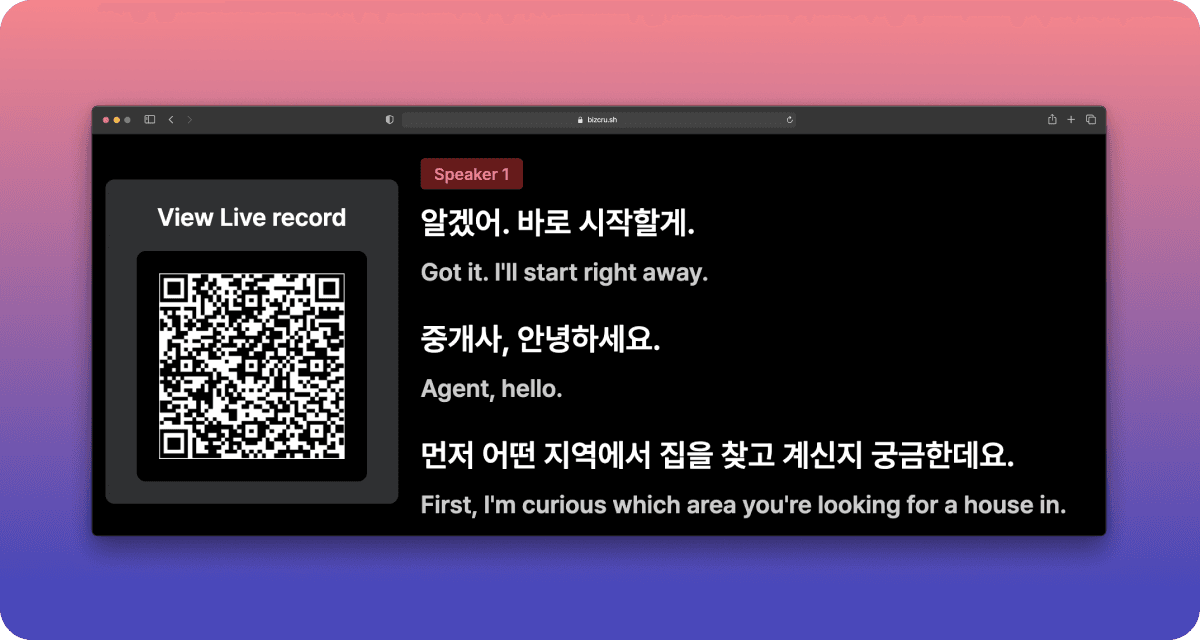
We provide real-time spoken interpretation in your preferred language during live meetings — no setup required.
Live captions and spoken translation are available at the same time.
(Available during live meetings + and for up to one hour after the meeting ends)
Shared Meeting access & Credits
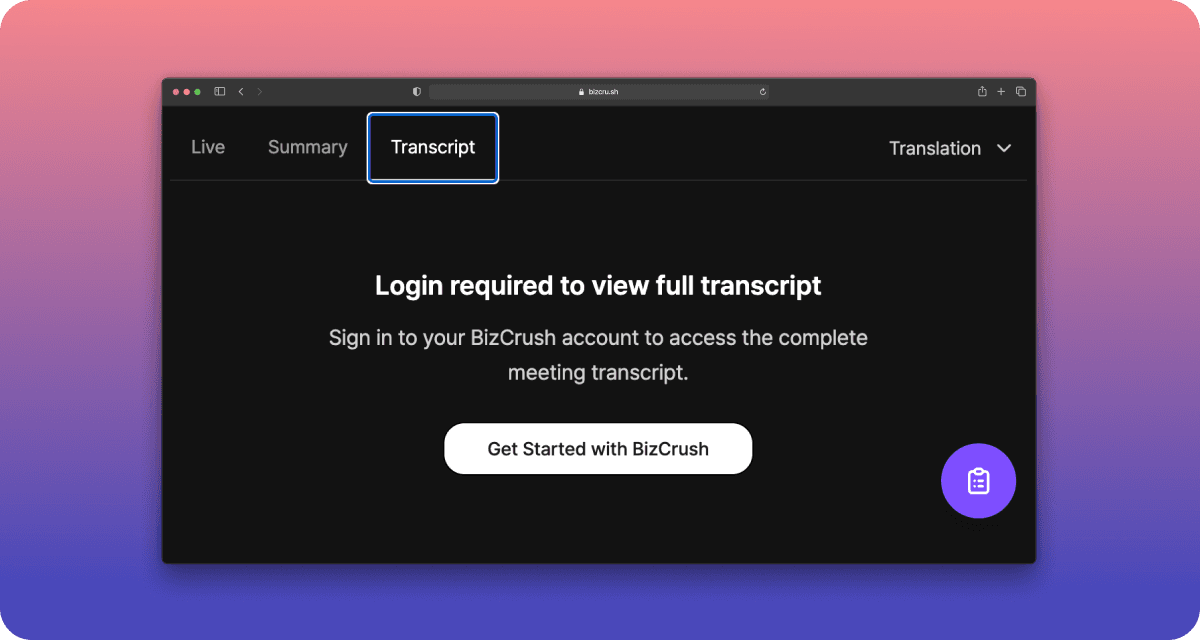
You can access full transcripts for shared meetings after logging in, even after the meeting ends.
When a new user signs up and veiws a meeting you shared, the host receives one hour of additional meeting credit. The more meetings you share, the more credits you can earn.
Jan 26, 2026
ver 0.22.19
Improvement
Improved Notion Integration
Meeting notes are now cleaner and easier to manage in Notion, with participants and original scripts neatly linked for quick reference.
Better Translation Quality
More consistent tone in translated meeting summaries.
Live Transcription Word Boundary Handling
Words no longer get cut in the middle. No more cut words.
Release
Live Multilingual Summaries
Live meeting summaries are now translated automatically into multiple languages based on your meeting settings.
Jan 19, 2026
ver 0.22.17
Improvement
Improved Audio - Transcript Sync on iOS
Audio playback now aligns more accurately with transcripts on Apple devices.
(Note: Applies to newly recorded sessions. Older recordings will be updated later.)
Jan 14, 2026
ver 0.22.15
Improvement
Smarter Summaries
Meeting summaries now highlight key decisions, schedules and next steps, so you can see what was decided at a glance.
More Accurate Speaker Separation
After the meeting, speaker separation is now more precise, reducing manual cleanup.
Easy speaker label editing
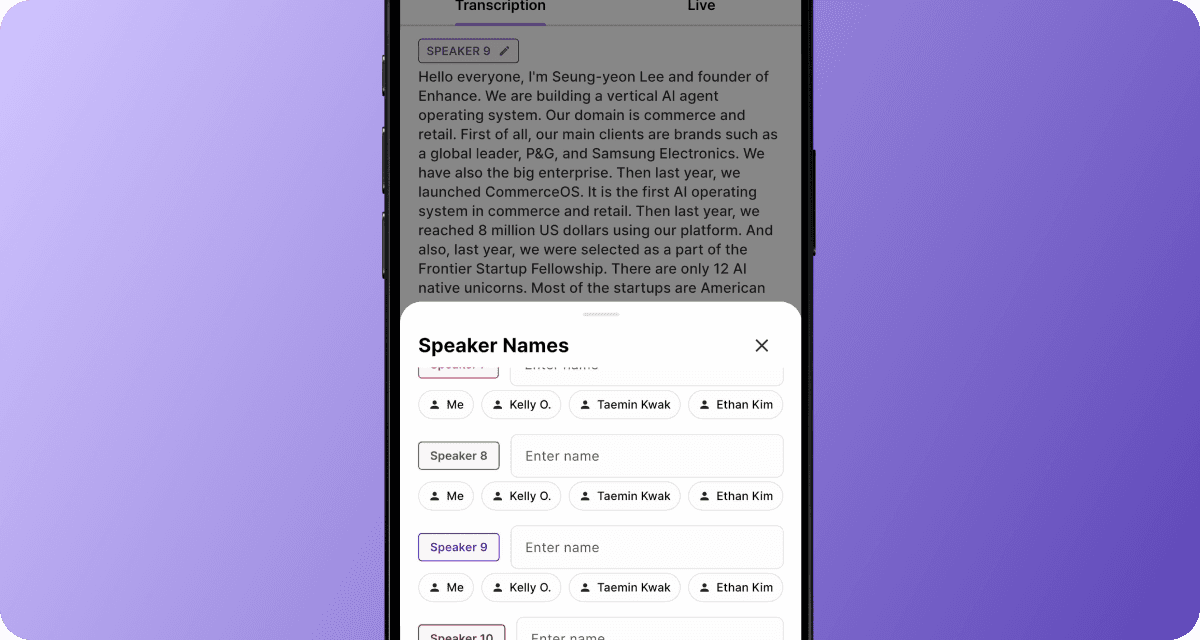
When editing speaker labels, the speaker list automatically scrolls to the selected speaker for easier editing.
Improved Live Transcript
Live transcripts detect sentence boundaries more accurately, producing cleaner, more readable text in real time.
Jan 6, 2026
ver 0.22.13
Improvement
Jump to Source from Summaries
Click any cited source in a summary to jump directly to the corresponding section in the transcript.
Quickly Delete or Leave Meetings
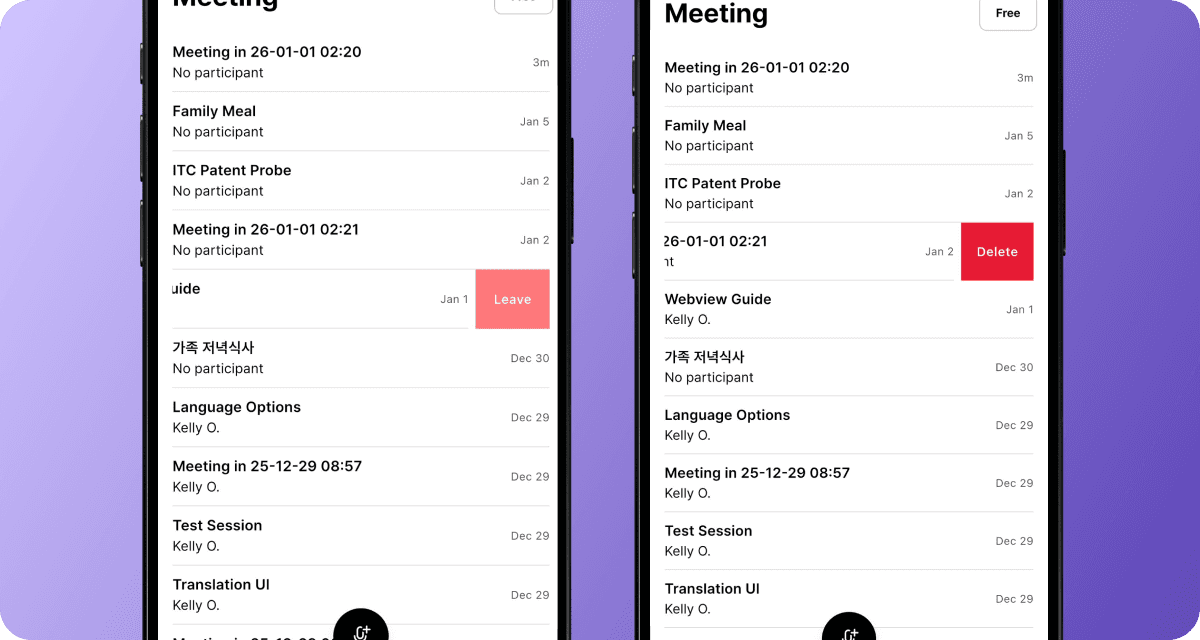
Swipe left on a meeting to quickly delete it or leave invited meetings.
Meeting Tabs Renamed to All & Me

Meeting rooms now use All and Me tabs to clearly separate shared content from private notes, follow-ups, and AI questions.
Release
Add Participants via Business Cards
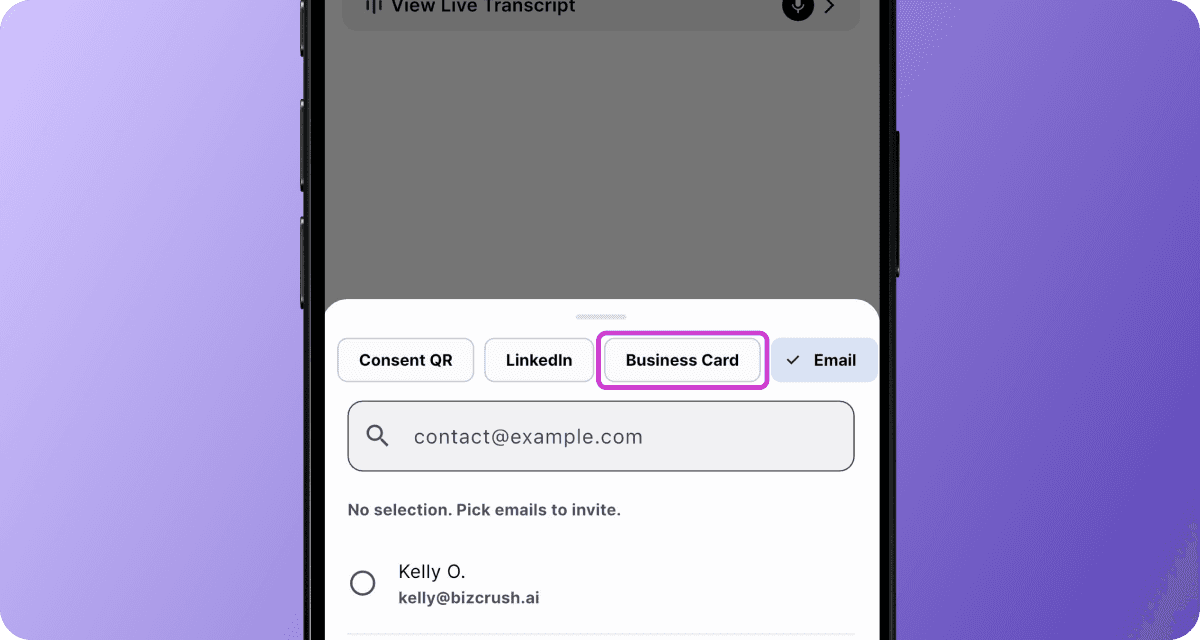
Scan a business card in the meeting room to automatically capture and add participant details.
Export Meeting Data to Excel

Export summaries and participant details (same data as our
Sync HubSpot) as an Excel file from the meeting options.Select Export to Excel to download or share
Preview up to 1,000 items instantly
On desktop, the Excel file opens automatically
On mobile, share directly from the app
Control Recordings from System UI
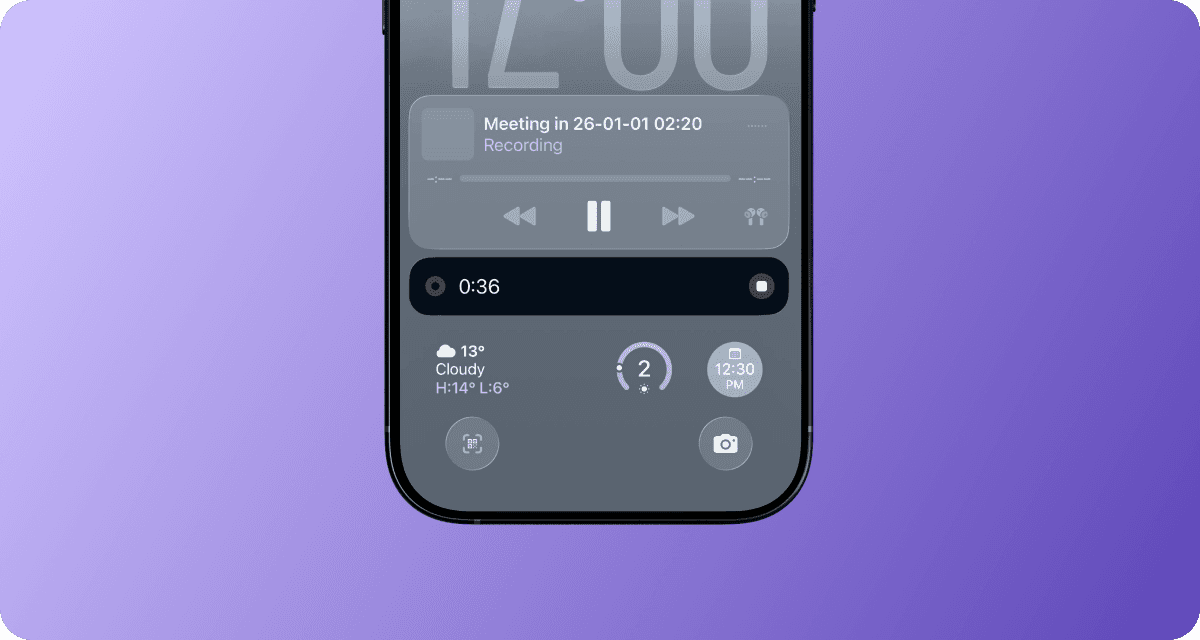
Start, pause, and manage live recordings directly from the system UI on both iOS and Android.
Dec 29, 2025
ver 0.22.40
Improvement
Post-Meeting Transcripts, Now Auto Translated
Post-meeting transcripts are now automatically translated into the same languages you selected for live translation.
Release
Multiple Translation Languages Support
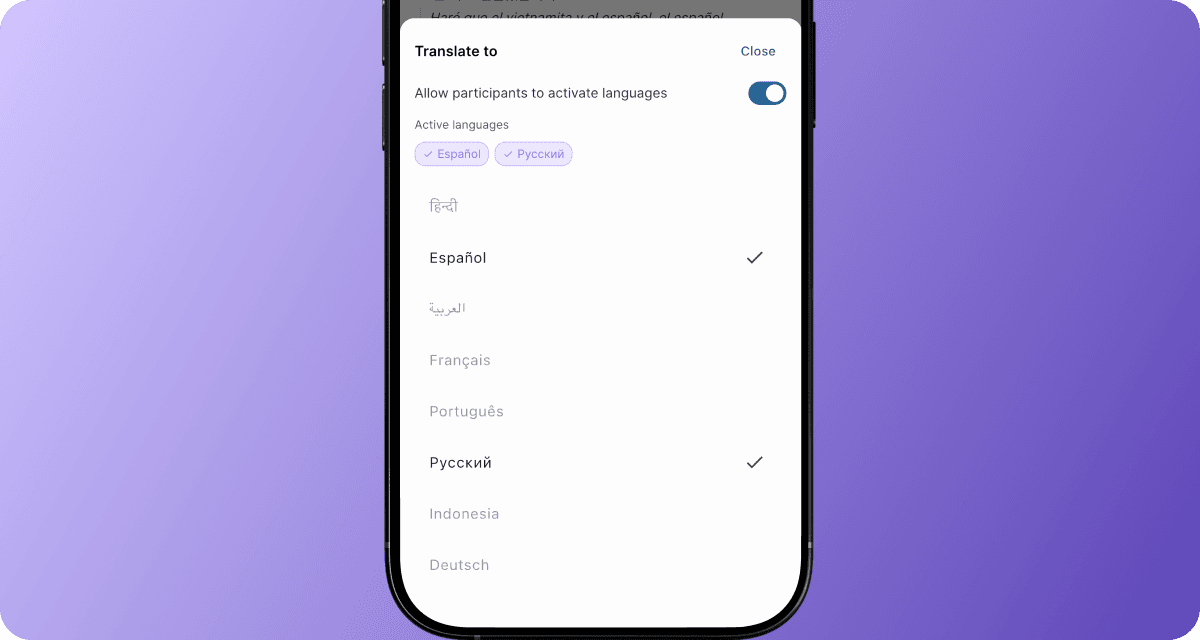
View multiple translation languages side by side on a single device.
In translation settings, the host can pre-select multiple translation languages, allowing participants to switch and view them anytime during the meeting.
9 New Languages Added for Translation
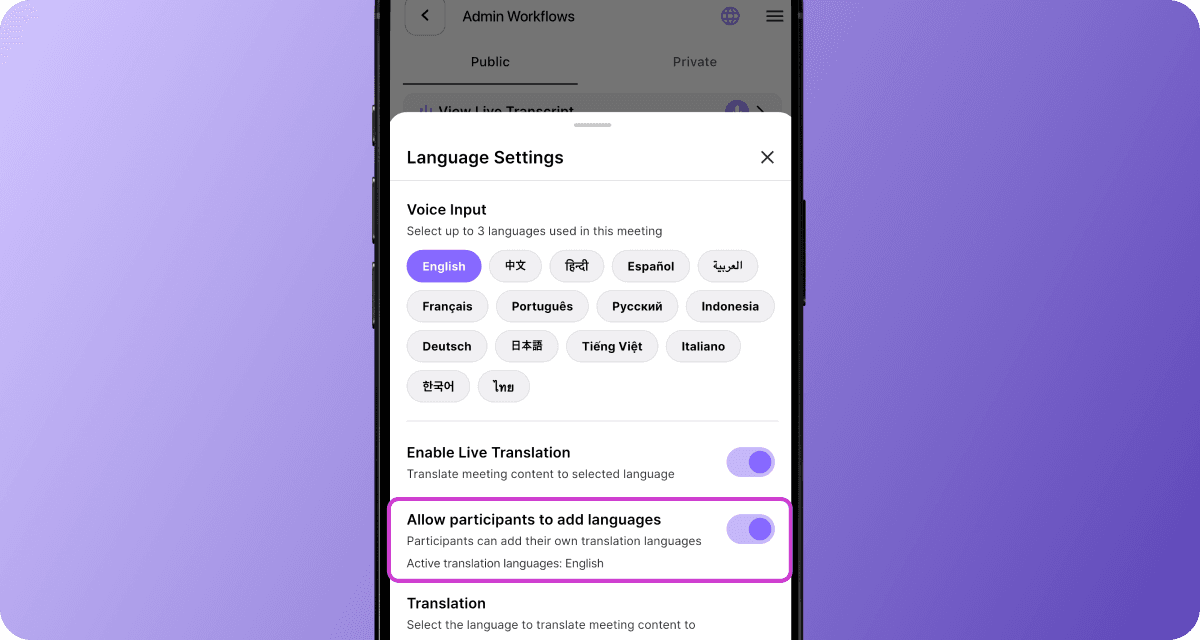
When the host enables “Allow participants to add languages” in the
Language Settings tab, participants can view translations in their preferred language on their own device.Meetings can now be transcribed and translated in 9 additional languages, including:
Arabic (العربية)
French (Français)
German (Deutsch)
Indonesian (Indonesia)
Italian (Italiano)
Portuguese (Português)
Russian (Русский)
Thai (ไทย)
Vietnamese (Tiếng Việt)
Public Live Meeting Links
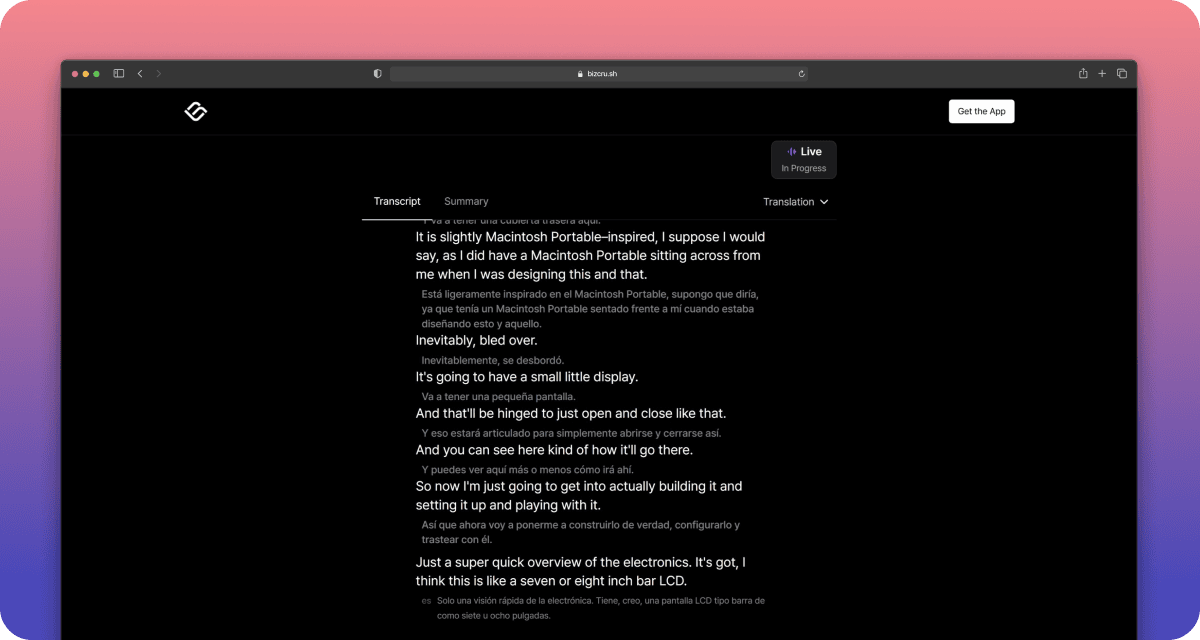
Share a live transcript, translation, and summary with anyone via a public link — no account required.
Built for conferences, lectures, or webinars where audiences can follow along in real time.
Source Links in Live Summary
Each key point in the live summary now includes a source link
Tap to jump directly to the exact moment in the transcript.
All
Improvement
Release
Jul 6, 2026
ver 0.26.16
Improvement
Custom View Options
You can increase the transcript text size up to 200% and turn language and speaker labels on or off, allowing you to easily customize the display to your preferences.
Choose QR Code Save Location
You can pick where to save a QR code image when downloading it from the desktop app.
Release
Easier Rename Meetings on Desktop App
You can now right-click a meeting in the Windows and macOS desktop meeting list to rename it directly.
Jun 17, 2026
ver 0.26.8
Improvement
Language Labels in Live Meetings
Language labels are now displayed more clearly, helping you quickly identify translations across multiple languages.
Full-Screen Mode
Full-screen mode now hides navigation and menu elements during meetings. Focus on transcripts and translations without distractions.
Release
Search Meeting Transcripts
Quickly find any keyword within a meeting transcript and jump directly to the relevant part of the conversation.
Jun 10, 2026
ver 0.26.7
Improvement
Meeting Room Menu Redesign
Reorganized the meeting room menu so that frequently used tools like Personal Memo and Notion uploads are easier to find
Sharing UI Update
Moved sharing actions into a more intuitive layout.
Larger Live Transcript Text
Increased the maximum transcript text size from 125% to 150% for better readability
Release
Smarter Transcript Editing
Get AI-powered correction suggestions for potential real-time transcript errors
Jun 1, 2026
ver 0.26.3
Improvement
Share Meetings in One Click
Invite participants faster with the new Share button.
Download a QR code image and share meetings with large groups more easily
Manage Keywords & Context More Easily
Add and edit meeting keywords and context from one place, right inside the meeting room.
Release
Resize Live Transcripts
Make live transcripts easier to read by adjusting the preferred font size in the meeting room.
May 29, 2026
ver 0.26.0
Improvement
More Precise Sentence Segmentation
Captions and transcripts now handle abbreviations (e.g., Mr., Dr.) and sentence endings more naturally across different languages, making them easier to read.
Release
Post-Meeting Transcript Translation
You can now translate the entire transcript of any completed meeting into your preferred language with a single click. This works for both new and previously recorded meetings.
Google Calendar Sync Support
Connect with Google Calendar to automatically sync upcoming meetings and manage them with ease.
May 18, 2026
ver 0.25.8
Improvement
More Reliable Notion Integration
If you need to renew your Notion permissions or run into connection issues, guidance is provided to update the necessary permissions.
Faster Real-Time AI Assistant Responses
No more waiting for AI assistant responses and replies now appear in real time.
Watch streaming responses live as they are generated.
Release
Set Up to Two Translation Languages on the Web
You can now choose up to two translation languages on the web, making multilingual meetings easier to follow.
May 4, 2026
ver 0.24.10
Improvement
More accurate real-time captions
Transcripts are now cleaner and more accurate, with fewer incorrect words and sentences that better reflect what was actually said.
More reliable translations
Translations are now more stable and continue seamlessly even when errors occur, delivering complete results without interruptions.
Apr 30, 2026
ver 0.24.8
Improvement
More reliable calendar-scheduled meetings
The meeting bot now joins calendar-booked meetings more consistently, keeping real-time subtitles stable without interruptions.
Cleaner speaker separation
When speakers switch, transcripts stay clearly separated with no more mixed sentences.
Faster live transcription & translation
Captions and translations kick in faster right at the start of each meeting.
Release
Live transcription for co-hosts
Co-hosts can now control and use live subtitle overlays during meetings, not just the primary host.
Apr 22, 2026
ver 0.24.1
Improvement
Cleaner Transcripts
Merges fragmented speech and removes filler words for more readable transcripts.
More Reliable Audio
Automatically switches to a backup recording if issues occur, so nothing gets lost.
Sensitive info protection
Automatically redacts sensitive information in meetings for safer sharing.
Release
Meeting summary push notifications
Participants now get a push notification when a meeting summary is ready.
Apr 14, 2026
ver 0.23.10
Improvement
Accurate participants’ names in Notion
Participants' names are now displayed more accurately on the Notion page.
More natural live transcription during quiet moments
Live transcription now recognizes silent moments during conversations to generate a more natural transcript.
Release
Online Meeting Support
You can now record your online meetings with the BizCrush bot.
Open the side menu in the top-right corner of the meeting room.
Select “Online Meeting Bot” and paste your online meeting link to invite the BizCrush bot.
(Note: You must accept the BizCrush bot’s participation in the online meeting so it can record the session.)The following meeting platforms are supported:
Zoom
Google Meet
Microsoft Teams
Assign a Co-host
You can now assign invited attendees as co-hosts, allowing them to manage the meeting room.
Open the side menu in the top-right corner of the meeting room.
Tap and hold a participant for 3 seconds to open the “Co-host” menu.
Co-hosts have full access to meeting room controls as the host:
Edit live transcripts
Start/stop recording
Rename the meeting room
Assign speaker labels
Create and send follow-up emails
Mar 27, 2026
ver 0.23.3
Improvement
Accurate Speaker Names in Summary Emails
Summary emails now reflect speaker names more accurately based on the meeting script.
Improved Multilingual Meeting Accuracy
Improved language detection and translation quality in meeting transcripts involving +3 languages, with no additional setup required.
Mar 10, 2026
ver 0.22.32
Improvement
More natural live translation
Recent conversation flow and context now help keep live translation tone and phrasing more consistent.
Mar 6, 2026
ver 0.22.32
Improvement
Improved Meeting Summary Table
The meeting summary table now looks cleaner across the app, email, and Notion.
More Accurate Speaker Detection
If the speaker’s identity is recognized during the meeting, the AI automatically updates the transcript afterward and assigns the correct speaker names to each part of the conversation.
Improved Long Speeches Handling
Long speeches are split with accurate timestamps for easier playback.
Enhanced Push Notification
Meeting notifications are now delivered more reliably.
Feb 9, 2026
ver 0.22.25
Improvement
Cleaner Email Summaries
Meeting summaries are now clearer, and easier to scan.
Accurate translation — even for short and broken sentences
Under 300-character utterances are translated with full context accuracy.
Even if speakers stop mid-sentence (”um”, “uh”, “like”), the system reconstructs context and delivers coherent translations.
Release
“View Meeting" button in Emails
Open the full meeting record directly from your email with one click.
Voiceprint Speaker Identification
(Pro plan Only) Automatically detects who’s speaking and labels them by voice
Feb 2, 2026
ver 0.22.20
Improvement
Improved Multilingual Transcription
Non-English languages are now detected and transcribed more accurately.
Faster Real-Time Captions
Live captions load faster and feel smoother on the web.
Release
AI Speaker Name Recognition
Speaker names are automatically inferred from the conversation context and assigned to speaker labels when identified, enabling more accurate meeting summaries.
Live Speech-to-Speech Interpretation (Web)
We provide real-time spoken interpretation in your preferred language during live meetings — no setup required.
Live captions and spoken translation are available at the same time.
(Available during live meetings + and for up to one hour after the meeting ends)
Shared Meeting access & Credits
You can access full transcripts for shared meetings after logging in, even after the meeting ends.
When a new user signs up and veiws a meeting you shared, the host receives one hour of additional meeting credit. The more meetings you share, the more credits you can earn.
Jan 26, 2026
ver 0.22.19
Improvement
Improved Notion Integration
Meeting notes are now cleaner and easier to manage in Notion, with participants and original scripts neatly linked for quick reference.
Better Translation Quality
More consistent tone in translated meeting summaries.
Live Transcription Word Boundary Handling
Words no longer get cut in the middle. No more cut words.
Release
Live Multilingual Summaries
Live meeting summaries are now translated automatically into multiple languages based on your meeting settings.
Jan 19, 2026
ver 0.22.17
Improvement
Improved Audio - Transcript Sync on iOS
Audio playback now aligns more accurately with transcripts on Apple devices.
(Note: Applies to newly recorded sessions. Older recordings will be updated later.)
Jan 14, 2026
ver 0.22.15
Improvement
Smarter Summaries
Meeting summaries now highlight key decisions, schedules and next steps, so you can see what was decided at a glance.
More Accurate Speaker Separation
After the meeting, speaker separation is now more precise, reducing manual cleanup.
Easy speaker label editing
When editing speaker labels, the speaker list automatically scrolls to the selected speaker for easier editing.
Improved Live Transcript
Live transcripts detect sentence boundaries more accurately, producing cleaner, more readable text in real time.
Jan 6, 2026
ver 0.22.13
Improvement
Jump to Source from Summaries
Click any cited source in a summary to jump directly to the corresponding section in the transcript.
Quickly Delete or Leave Meetings
Swipe left on a meeting to quickly delete it or leave invited meetings.
Meeting Tabs Renamed to All & Me
Meeting rooms now use All and Me tabs to clearly separate shared content from private notes, follow-ups, and AI questions.
Release
Add Participants via Business Cards
Scan a business card in the meeting room to automatically capture and add participant details.
Export Meeting Data to Excel
Export summaries and participant details (same data as our
Sync HubSpot) as an Excel file from the meeting options.Select Export to Excel to download or share
Preview up to 1,000 items instantly
On desktop, the Excel file opens automatically
On mobile, share directly from the app
Control Recordings from System UI
Start, pause, and manage live recordings directly from the system UI on both iOS and Android.
Dec 29, 2025
ver 0.22.40
Improvement
Post-Meeting Transcripts, Now Auto Translated
Post-meeting transcripts are now automatically translated into the same languages you selected for live translation.
Release
Multiple Translation Languages Support
View multiple translation languages side by side on a single device.
In translation settings, the host can pre-select multiple translation languages, allowing participants to switch and view them anytime during the meeting.
9 New Languages Added for Translation
When the host enables “Allow participants to add languages” in the
Language Settings tab, participants can view translations in their preferred language on their own device.Meetings can now be transcribed and translated in 9 additional languages, including:
Arabic (العربية)
French (Français)
German (Deutsch)
Indonesian (Indonesia)
Italian (Italiano)
Portuguese (Português)
Russian (Русский)
Thai (ไทย)
Vietnamese (Tiếng Việt)
Public Live Meeting Links
Share a live transcript, translation, and summary with anyone via a public link — no account required.
Built for conferences, lectures, or webinars where audiences can follow along in real time.
Source Links in Live Summary
Each key point in the live summary now includes a source link
Tap to jump directly to the exact moment in the transcript.
All
Improvement
Release
Jul 6, 2026
ver 0.26.16
Improvement
Custom View Options
You can increase the transcript text size up to 200% and turn language and speaker labels on or off, allowing you to easily customize the display to your preferences.
Choose QR Code Save Location
You can pick where to save a QR code image when downloading it from the desktop app.
Release
Easier Rename Meetings on Desktop App
You can now right-click a meeting in the Windows and macOS desktop meeting list to rename it directly.
Jun 17, 2026
ver 0.26.8
Improvement
Language Labels in Live Meetings
Language labels are now displayed more clearly, helping you quickly identify translations across multiple languages.
Full-Screen Mode
Full-screen mode now hides navigation and menu elements during meetings. Focus on transcripts and translations without distractions.
Release
Search Meeting Transcripts
Quickly find any keyword within a meeting transcript and jump directly to the relevant part of the conversation.
Jun 10, 2026
ver 0.26.7
Improvement
Meeting Room Menu Redesign
Reorganized the meeting room menu so that frequently used tools like Personal Memo and Notion uploads are easier to find
Sharing UI Update
Moved sharing actions into a more intuitive layout.
Larger Live Transcript Text
Increased the maximum transcript text size from 125% to 150% for better readability
Release
Smarter Transcript Editing
Get AI-powered correction suggestions for potential real-time transcript errors
Jun 1, 2026
ver 0.26.3
Improvement
Share Meetings in One Click
Invite participants faster with the new Share button.
Download a QR code image and share meetings with large groups more easily
Manage Keywords & Context More Easily
Add and edit meeting keywords and context from one place, right inside the meeting room.
Release
Resize Live Transcripts
Make live transcripts easier to read by adjusting the preferred font size in the meeting room.
May 29, 2026
ver 0.26.0
Improvement
More Precise Sentence Segmentation
Captions and transcripts now handle abbreviations (e.g., Mr., Dr.) and sentence endings more naturally across different languages, making them easier to read.
Release
Post-Meeting Transcript Translation
You can now translate the entire transcript of any completed meeting into your preferred language with a single click. This works for both new and previously recorded meetings.
Google Calendar Sync Support
Connect with Google Calendar to automatically sync upcoming meetings and manage them with ease.
May 18, 2026
ver 0.25.8
Improvement
More Reliable Notion Integration
If you need to renew your Notion permissions or run into connection issues, guidance is provided to update the necessary permissions.
Faster Real-Time AI Assistant Responses
No more waiting for AI assistant responses and replies now appear in real time.
Watch streaming responses live as they are generated.
Release
Set Up to Two Translation Languages on the Web
You can now choose up to two translation languages on the web, making multilingual meetings easier to follow.
May 4, 2026
ver 0.24.10
Improvement
More accurate real-time captions
Transcripts are now cleaner and more accurate, with fewer incorrect words and sentences that better reflect what was actually said.
More reliable translations
Translations are now more stable and continue seamlessly even when errors occur, delivering complete results without interruptions.
Apr 30, 2026
ver 0.24.8
Improvement
More reliable calendar-scheduled meetings
The meeting bot now joins calendar-booked meetings more consistently, keeping real-time subtitles stable without interruptions.
Cleaner speaker separation
When speakers switch, transcripts stay clearly separated with no more mixed sentences.
Faster live transcription & translation
Captions and translations kick in faster right at the start of each meeting.
Release
Live transcription for co-hosts
Co-hosts can now control and use live subtitle overlays during meetings, not just the primary host.
Apr 22, 2026
ver 0.24.1
Improvement
Cleaner Transcripts
Merges fragmented speech and removes filler words for more readable transcripts.
More Reliable Audio
Automatically switches to a backup recording if issues occur, so nothing gets lost.
Sensitive info protection
Automatically redacts sensitive information in meetings for safer sharing.
Release
Meeting summary push notifications
Participants now get a push notification when a meeting summary is ready.
Apr 14, 2026
ver 0.23.10
Improvement
Accurate participants’ names in Notion
Participants' names are now displayed more accurately on the Notion page.
More natural live transcription during quiet moments
Live transcription now recognizes silent moments during conversations to generate a more natural transcript.
Release
Online Meeting Support
You can now record your online meetings with the BizCrush bot.
Open the side menu in the top-right corner of the meeting room.
Select “Online Meeting Bot” and paste your online meeting link to invite the BizCrush bot.
(Note: You must accept the BizCrush bot’s participation in the online meeting so it can record the session.)The following meeting platforms are supported:
Zoom
Google Meet
Microsoft Teams
Assign a Co-host
You can now assign invited attendees as co-hosts, allowing them to manage the meeting room.
Open the side menu in the top-right corner of the meeting room.
Tap and hold a participant for 3 seconds to open the “Co-host” menu.
Co-hosts have full access to meeting room controls as the host:
Edit live transcripts
Start/stop recording
Rename the meeting room
Assign speaker labels
Create and send follow-up emails
Mar 27, 2026
ver 0.23.3
Improvement
Accurate Speaker Names in Summary Emails
Summary emails now reflect speaker names more accurately based on the meeting script.
Improved Multilingual Meeting Accuracy
Improved language detection and translation quality in meeting transcripts involving +3 languages, with no additional setup required.
Mar 10, 2026
ver 0.22.32
Improvement
More natural live translation
Recent conversation flow and context now help keep live translation tone and phrasing more consistent.
Mar 6, 2026
ver 0.22.32
Improvement
Improved Meeting Summary Table
The meeting summary table now looks cleaner across the app, email, and Notion.
More Accurate Speaker Detection
If the speaker’s identity is recognized during the meeting, the AI automatically updates the transcript afterward and assigns the correct speaker names to each part of the conversation.
Improved Long Speeches Handling
Long speeches are split with accurate timestamps for easier playback.
Enhanced Push Notification
Meeting notifications are now delivered more reliably.
Feb 9, 2026
ver 0.22.25
Improvement
Cleaner Email Summaries
Meeting summaries are now clearer, and easier to scan.
Accurate translation — even for short and broken sentences
Under 300-character utterances are translated with full context accuracy.
Even if speakers stop mid-sentence (”um”, “uh”, “like”), the system reconstructs context and delivers coherent translations.
Release
“View Meeting" button in Emails
Open the full meeting record directly from your email with one click.
Voiceprint Speaker Identification
(Pro plan Only) Automatically detects who’s speaking and labels them by voice
Feb 2, 2026
ver 0.22.20
Improvement
Improved Multilingual Transcription
Non-English languages are now detected and transcribed more accurately.
Faster Real-Time Captions
Live captions load faster and feel smoother on the web.
Release
AI Speaker Name Recognition
Speaker names are automatically inferred from the conversation context and assigned to speaker labels when identified, enabling more accurate meeting summaries.
Live Speech-to-Speech Interpretation (Web)
We provide real-time spoken interpretation in your preferred language during live meetings — no setup required.
Live captions and spoken translation are available at the same time.
(Available during live meetings + and for up to one hour after the meeting ends)
Shared Meeting access & Credits
You can access full transcripts for shared meetings after logging in, even after the meeting ends.
When a new user signs up and veiws a meeting you shared, the host receives one hour of additional meeting credit. The more meetings you share, the more credits you can earn.
Jan 26, 2026
ver 0.22.19
Improvement
Improved Notion Integration
Meeting notes are now cleaner and easier to manage in Notion, with participants and original scripts neatly linked for quick reference.
Better Translation Quality
More consistent tone in translated meeting summaries.
Live Transcription Word Boundary Handling
Words no longer get cut in the middle. No more cut words.
Release
Live Multilingual Summaries
Live meeting summaries are now translated automatically into multiple languages based on your meeting settings.
Jan 19, 2026
ver 0.22.17
Improvement
Improved Audio - Transcript Sync on iOS
Audio playback now aligns more accurately with transcripts on Apple devices.
(Note: Applies to newly recorded sessions. Older recordings will be updated later.)
Jan 14, 2026
ver 0.22.15
Improvement
Smarter Summaries
Meeting summaries now highlight key decisions, schedules and next steps, so you can see what was decided at a glance.
More Accurate Speaker Separation
After the meeting, speaker separation is now more precise, reducing manual cleanup.
Easy speaker label editing
When editing speaker labels, the speaker list automatically scrolls to the selected speaker for easier editing.
Improved Live Transcript
Live transcripts detect sentence boundaries more accurately, producing cleaner, more readable text in real time.
Jan 6, 2026
ver 0.22.13
Improvement
Jump to Source from Summaries
Click any cited source in a summary to jump directly to the corresponding section in the transcript.
Quickly Delete or Leave Meetings
Swipe left on a meeting to quickly delete it or leave invited meetings.
Meeting Tabs Renamed to All & Me
Meeting rooms now use All and Me tabs to clearly separate shared content from private notes, follow-ups, and AI questions.
Release
Add Participants via Business Cards
Scan a business card in the meeting room to automatically capture and add participant details.
Export Meeting Data to Excel
Export summaries and participant details (same data as our
Sync HubSpot) as an Excel file from the meeting options.Select Export to Excel to download or share
Preview up to 1,000 items instantly
On desktop, the Excel file opens automatically
On mobile, share directly from the app
Control Recordings from System UI
Start, pause, and manage live recordings directly from the system UI on both iOS and Android.
Dec 29, 2025
ver 0.22.40
Improvement
Post-Meeting Transcripts, Now Auto Translated
Post-meeting transcripts are now automatically translated into the same languages you selected for live translation.
Release
Multiple Translation Languages Support
View multiple translation languages side by side on a single device.
In translation settings, the host can pre-select multiple translation languages, allowing participants to switch and view them anytime during the meeting.
9 New Languages Added for Translation
When the host enables “Allow participants to add languages” in the
Language Settings tab, participants can view translations in their preferred language on their own device.Meetings can now be transcribed and translated in 9 additional languages, including:
Arabic (العربية)
French (Français)
German (Deutsch)
Indonesian (Indonesia)
Italian (Italiano)
Portuguese (Português)
Russian (Русский)
Thai (ไทย)
Vietnamese (Tiếng Việt)
Public Live Meeting Links
Share a live transcript, translation, and summary with anyone via a public link — no account required.
Built for conferences, lectures, or webinars where audiences can follow along in real time.
Source Links in Live Summary
Each key point in the live summary now includes a source link
Tap to jump directly to the exact moment in the transcript.